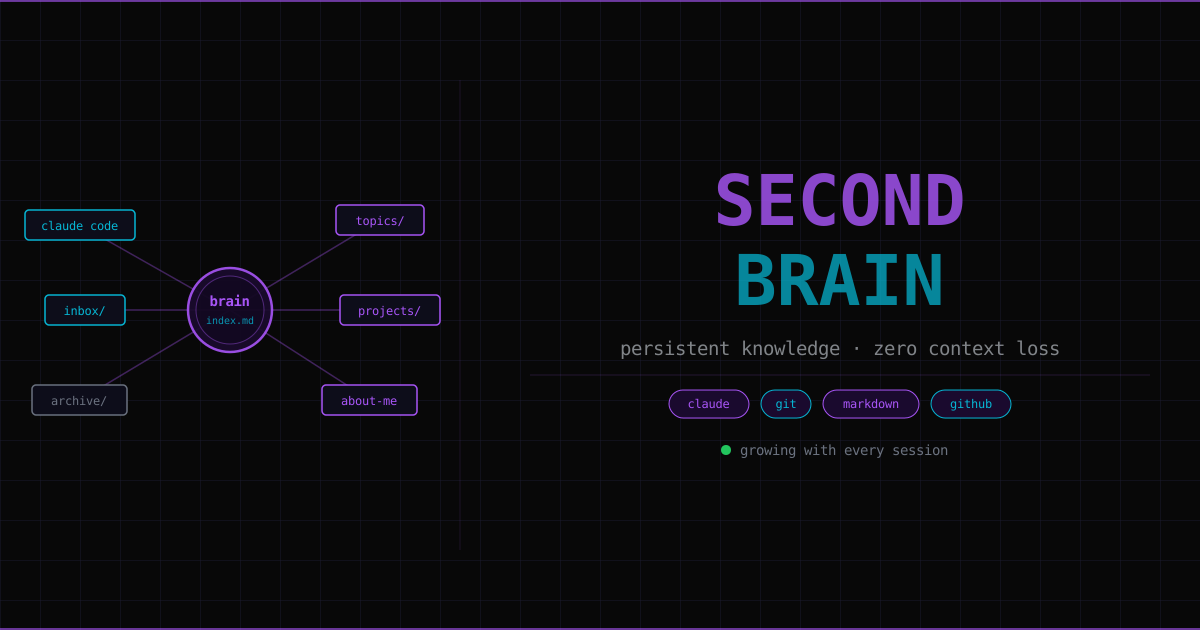
This page explains the second brain system this blog uses — not just what it is, but why the problem exists, how the solution works at a technical level, and how you could build your own version from scratch.
The problem: AI conversations are ephemeral#
Every conversation with an AI starts cold. The model has no memory of previous sessions. You explain who you are, what you’re working on, and what you already know — and then next time, you do it again. Over dozens of sessions, this re-introduction overhead compounds into something genuinely frustrating.
There’s a second problem: the conversations themselves contain valuable learning. If you’ve just spent an hour working through how DNS records work, the model’s explanation is sitting there in your chat history, mixed in with all the noise, and will eventually vanish. None of it gets retained anywhere useful.
A second brain is a system for solving both problems:
- Give the AI standing context — so it knows who you are before you say a word
- Capture knowledge as it happens — so conversations get distilled into permanent notes
What Claude Code is, and how its context system works#
Claude Code is an AI assistant that runs as a command-line interface (CLI) — a program you run in a terminal. Unlike the web chat interface, it has access to your filesystem. It can read files, write files, run shell commands, and search your codebase.
The key feature for this system: CLAUDE.md.
When Claude Code starts in a directory, it looks for a file called CLAUDE.md and reads it before doing anything else. This file is plain text — you write instructions in it, and the AI treats them as standing rules for every session. It’s the equivalent of briefing a new colleague every morning, except you only write the brief once.
The CLAUDE.md for this project contains instructions like:
## At the start of every session

1. Check the inbox first — run `ls inbox/` and list any files
2. If inbox has files — process each one before doing anything else
3. Read `brain/index.md` to get oriented
4. Read any brain files relevant to the current task
Claude Code reads this and follows those steps automatically. You don’t remind it. You don’t re-explain. The context is always there.
Session memory files go a step further. The memory/ folder contains concise .md files that get loaded into every conversation automatically. Think of them as the AI’s working memory — short, structured notes about who you are, what you’re building, and how you want to collaborate.
The folder structure#
ghNotes/
├── CLAUDE.md       ← standing instructions for every session
├── inbox/          ← drop raw files here (notes, articles, anything)
├── archive/        ← processed inbox files (date-prefixed)
├── brain/
│   ├── index.md          ← read first every session — navigation hub
│   ├── about-me.md       ← background, goals, preferences
│   ├── projects/         ← one file per ongoing project
│   └── topics/           ← domain knowledge and skills
└── memory/               ← concise session-level pointers
Each folder has a distinct role:
inbox/ is the input. When you learn something, read something, or want to remember a conversation, you write a raw .md file and drop it here. It doesn’t need to be formatted — just captured. The AI processes it at the start of the next session.
brain/ is the output. Distilled, structured notes. The AI reads these to understand your context. You write to them when something important happens.
archive/ is processed history. Once the AI reads an inbox file and extracts the useful parts into the brain, it moves the original to archive/ with a date prefix: 2026-06-09_dns-notes.md. You can refer back to originals if needed, but they’re out of the active path.
memory/ is the fastest-loading layer. These are short, one-concept-per-file notes that get loaded every session automatically. The brain has depth; memory has speed.
The inbox-to-brain workflow#
This is the core loop:
1. You learn something or want to capture a conversation
2. Write a raw note, paste an article, or export a chat to inbox/
3. Next Claude Code session: AI reads inbox/, extracts what matters
4. AI merges it into the right brain file (topics/ or projects/)
5. AI moves the raw file to archive/ with a date prefix
6. You start from richer context next time
The inbox means you never need to be disciplined about when to take notes. Just drop whatever you have, in whatever state it’s in. The AI handles the distillation.
The brain files are written in a specific style: dense and structured, no padding. The goal is high signal per line — bullet points, examples, concrete facts. The AI that reads these files needs to extract context quickly, not wade through prose.
A good brain file entry looks like this:
## DNS record types

### CNAME record
Alias — maps a name to another name, not an IP.
Use for subdomains pointing at services (GitHub, Vercel) because their IPs change.
Example: `blog → syed-imad.github.io` creates `blog.imadinc.com`

The resolution chain: blog.imadinc.com → syed-imad.github.io → GitHub's IP → site
Contrast with what you’d write in a chat message or casual note. The brain file strips all conversational scaffolding and keeps only the reusable knowledge.
Why Git and Markdown as the storage format#
This system stores everything as plain text .md files in a Git repository. That choice is deliberate.
Markdown is just text with lightweight formatting (headers with #, bold with **, lists with -). Any text editor can read it. Any AI can read it. It will be readable in twenty years.
Git tracks every change with a timestamp and a message. Every time the brain files are updated, a commit records what changed, when, and why. You get a complete history of your learning — not just the current state, but how it evolved.
The alternative is a note-taking app (Notion, Obsidian, Bear). These are great tools, but they have lock-in: your notes are stored in a proprietary format or database. If the app disappears or changes its pricing, your notes are hard to migrate. A Git repo with Markdown files can be opened, read, and searched with any tool, forever.
To understand what Git is tracking:
git log --oneline -10Shows the last 10 commits — each one a snapshot of the brain at a point in time.
git diff HEAD~1Shows what changed since the previous commit.
Building your own#
You can replicate this system in about 15 minutes:
1. Create the repo:
mkdir second-brain && cd second-brain
git init
mkdir -p inbox archive brain/projects brain/topics memory
touch brain/index.md brain/about-me.md
2. Write a CLAUDE.md:
The key sections: what to do at session start, how to process inbox files, where to store different types of knowledge, and your preferred writing style. Be specific — the AI follows exactly what you write.
## At the start of every session
1. Run `ls inbox/` — process any files before anything else
2. Read `brain/index.md` to orient yourself

## Inbox processing
- Personal background → merge into `brain/about-me.md`
- Project work → create/update `brain/projects/<name>.md`
- Technical topic → create/update `brain/topics/<name>.md`
- After processing: move to `archive/YYYY-MM-DD_filename.md`
3. Write a first brain file:
Start with brain/about-me.md. Write your background, what you’re working on, and how you learn best. This is what the AI reads to understand who it’s talking to.
4. Push to GitHub:
git remote add origin https://github.com/yourusername/second-brain.git
git push -u origin main
5. Start using the inbox:
Next time you have something worth keeping — a good explanation from an AI, notes from a course, a decision you made on a project — drop a .md file in inbox/. Open Claude Code at the repo root the next day. The rest happens automatically.
What compounds over time#
The reason this system gets more valuable the longer you use it: each session starts from the accumulated context of every previous session. An AI that knows your background, your current projects, your learning preferences, and your existing knowledge of a topic can give you much better help than one starting cold.
The brain grows incrementally. A week in, it knows your current projects. A month in, it knows your patterns and preferences. Six months in, it’s a genuine record of your learning across everything you’ve worked on.
Tech#
- ghNotes — the GitHub repo (private)
- Claude Code — reads and writes to it each session
- Markdown + Git — plain files, fully version controlled
- Claude.ai Projects — upload
brain/to the web app for context outside the terminal
Actively maintained. The brain grows with every session.