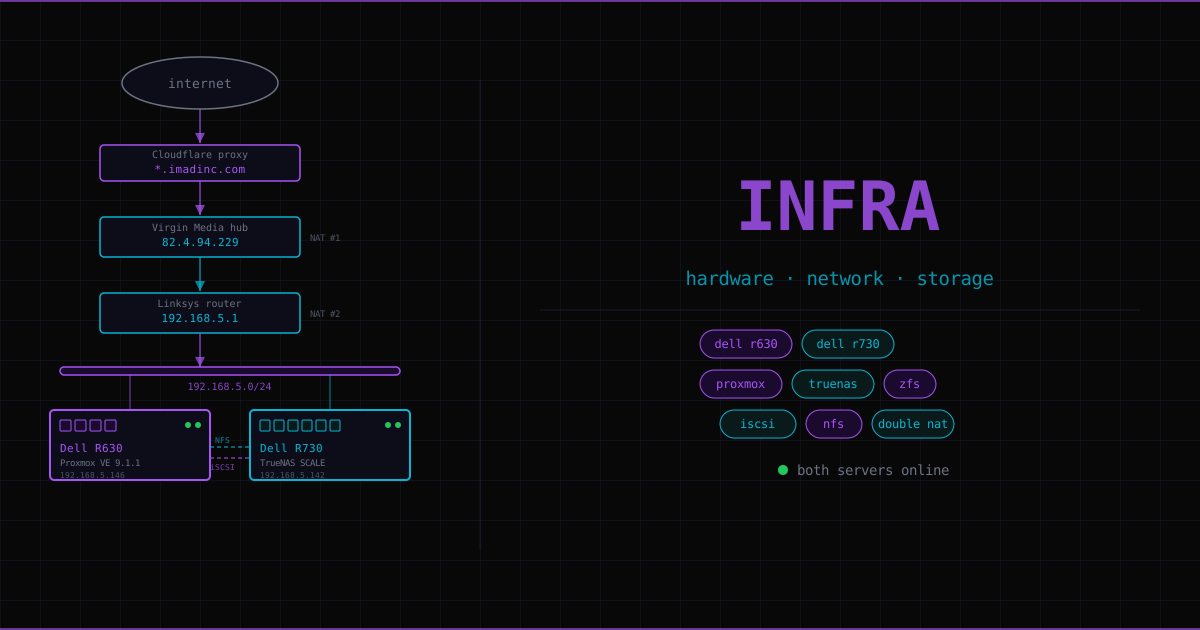
This page documents the physical infrastructure — the hardware, network topology, and storage layout that every service runs on top of. For the concepts behind the technology choices (why LXC over Docker, why ZFS, how iSCSI works), see Foundation.
Hardware#
Two decommissioned Dell enterprise servers, bought second-hand.
| Machine | Role | OS | IP | Specs |
|---|---|---|---|---|
| Dell R630 | Compute | Proxmox VE 9.1.1 | 192.168.5.146 | 1× CPU, 32 GB RAM, 1 TB SSD + 2× HDD |
| Dell R730 | Storage | TrueNAS SCALE | 192.168.5.142 | 2× CPU, 32 GB RAM, 8× 3 TB HDD |
Why two separate servers?
Mixing compute and storage on one machine creates a coupling problem: if you want to wipe and reinstall the OS, you risk your storage. Keeping them on separate machines means TrueNAS can be rebooted, upgraded, or replaced without touching a single running service. More importantly, it enforces a rule: no service stores permanent data locally. Every LXC’s local disk holds only its OS and binaries. All persistent data lives on TrueNAS. Any LXC can be nuked and recreated from scratch without losing anything.
Network topology#
The homelab sits on a single subnet: 192.168.5.0/24. The /24 prefix means the first 24 bits are fixed (192.168.5) and the last octet identifies the device — 254 usable addresses. Both servers have static IPs within this range.
Internet
   │
Cloudflare edge (imadinc.com)
   │  HTTPS — Cloudflare edge cert
82.4.94.229  ← home public IP
   │
Virgin Media hub    ← ISP modem/router, NAT #1
   │
Linksys router      ← 192.168.5.1, gateway, NAT #2
   │
192.168.5.0/24 LAN
   ├── Dell R630   192.168.5.146   (Proxmox VE)
   └── Dell R730   192.168.5.142   (TrueNAS SCALE)
Double NAT#
There are two routers between the internet and the homelab. The Virgin Media hub is the ISP-provided modem/router — it handles the connection to the public internet and does its own NAT. The Linksys router sits behind it, managing the home LAN as a second gateway.
NAT (Network Address Translation) is how routers let many private devices share one public IP. When a packet leaves a device on 192.168.5.x, the router rewrites the source address to its own public IP before sending it out. Replies come back to the router, which maps them to the right internal device. With two routers in series, both do this rewriting — which is double NAT.
The practical consequence: port forwarding must be configured on both routers.
Ports 80 and 443 are forwarded through the Virgin Media hub to the Linksys’s internal IP, then from the Linksys to NPM (LXC 104 at 192.168.5.109). A request from the internet traverses both NAT layers before reaching NPM.
The ideal fix — putting the Virgin Media hub into modem-only mode to eliminate double NAT — is on the cleanup list. For private remote access, Tailscale bypasses the router chain entirely using NAT traversal.
Cloudflare DNS#
Domain imadinc.com is managed through Cloudflare. A single wildcard A record covers every subdomain:
Type:  A
Name:  *.imadinc.com
Value: 82.4.94.229   (home public IP, dynamic)
Proxy: enabled (orange cloud)
Any new service added to NPM automatically gets its subdomain routed — no DNS changes required. Adding grafana.imadinc.com means configuring NPM, not touching Cloudflare at all.
Cloudflare proxied mode: Cloudflare terminates the incoming connection at its own edge servers and opens a new one to the home IP. The home IP is hidden from the public. The trade-off: Let’s Encrypt’s standard HTTP challenge doesn’t work (Cloudflare answers before NPM can). All certificates use the DNS challenge instead — NPM handles this automatically via the Cloudflare API token. See the NPM page for how certificates are provisioned.
How the two servers connect#
Proxmox (R630) uses TrueNAS (R730) as its storage backend. The connection is over the LAN to 192.168.5.142. Two storage protocols are in use:
| Protocol | TrueNAS object | Mounted as | Used for |
|---|---|---|---|
| NFS | Dataset | Directory tree | Media files, backups, ISOs, Obsidian vault |
| iSCSI | Zvol | Block device (/dev/sdb) | App data requiring file locking (Nextcloud, databases) |
NFS exports a filesystem — multiple machines can access it simultaneously. It works well for files that don’t need exclusive locking.
iSCSI exports a raw block device. The LXC formats it with ext4 and has exclusive ownership. Applications that rely on POSIX file locking (Nextcloud’s data directory, SQLite databases) require block storage — NFS doesn’t implement file locks reliably across a network. An iSCSI device looks like a locally attached disk, so locking works correctly.
Foundation covers ZFS (how TrueNAS manages the drives) and iSCSI (how the block device protocol works) in detail.
Storage layout#
Pool: MyMassStorage — 15.18 TiB total, 8× 3 TB HDDs.
| Name | Type | Size | Purpose | Protocol |
|---|---|---|---|---|
| MediaPool | Dataset | ~196 GB used | Movies, TV shows, downloads | NFS → VM 101 |
| Proxmox | Dataset | ~9 GB used | VM disks, backups, ISOs | NFS → Proxmox |
| ObsidianVault | Dataset | — | Obsidian markdown vault | NFS → LXC 105/106 |
| nextcloud-zvol | Zvol (sparse) | 2 TB | Nextcloud user data | iSCSI → LXC 103 |
| obsidianvault-zvol | Zvol (sparse) | 50 GB | Vault batch processing | iSCSI → LXC 106 |
| chroma-zvol | Zvol (sparse) | 100 GB | Vector DB embeddings | iSCSI → LXC 108 |
| n8n-zvol | Zvol (sparse) | 20 GB | n8n SQLite data | iSCSI → LXC 107 |
Snapshot schedule on ObsidianVault: hourly/1 day, daily/7 days, weekly/30 days, monthly/90 days.
Service inventory#
All services run on the R630 as Proxmox VMs or LXC containers. Every service that stores data does so on TrueNAS.
| ID | Type | IP | Status | Purpose |
|---|---|---|---|---|
| VM 100 | VM | — | Running | MinecraftServer — pre-existing game server |
| VM 101 | VM | 192.168.5.127 | Running | MediaServer — Docker host for arr stack + Plex |
| LXC 102 | LXC | 192.168.5.128 | ✅ Done | Tailscale — subnet router, remote access |
| LXC 103 | LXC | 192.168.5.134 | ✅ Done | Nextcloud — file sync via nextcloud.imadinc.com |
| LXC 104 | LXC | 192.168.5.109 | ✅ Done | Nginx Proxy Manager — reverse proxy + SSL |
| LXC 105 | LXC | planned | Planned | Obsidian MCP — Claude↔vault bridge |
| LXC 106 | LXC | planned | Planned | Claude Code — nightly vault processing |
| LXC 107 | LXC | planned | Planned | n8n — automation scheduler |
| LXC 108 | LXC | planned | Planned | Chroma — vector DB for semantic retrieval |
| LXC 109 | LXC | planned | Planned | Govee MCP — Claude smart light control |
Known issue: VM 101’s disk lives on TrueNAS NFS storage (TrueNasNFS) rather than local-lvm. The VM needs TrueNAS to boot — the dependency is backwards. This is on the cleanup list.
Public access flow#
How a request from the internet reaches a service:
Browser
  → Cloudflare DNS: *.imadinc.com resolves to 82.4.94.229
  → Cloudflare proxy (HTTPS, edge cert)
  → 82.4.94.229 port 443
  → Virgin Media hub: port 443 forwarded → Linksys WAN IP
  → Linksys: port 443 forwarded → 192.168.5.109
  → NPM LXC 104: reads SNI hostname, routes to correct backend
  → e.g. nextcloud.imadinc.com → 192.168.5.134:80
Two TLS sessions: browser↔Cloudflare uses Cloudflare’s edge certificate; Cloudflare↔NPM uses a Let’s Encrypt certificate (DNS challenge via Cloudflare API). NPM to backends is plain HTTP — SSL terminates at NPM. Cloudflare SSL mode is set to Full.