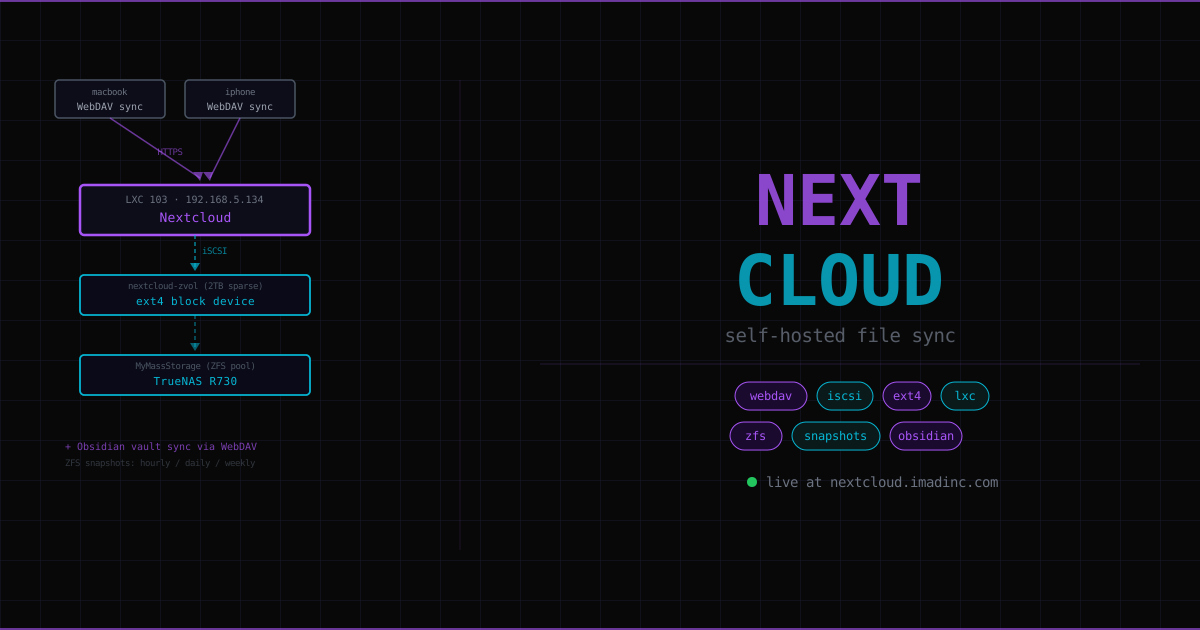
LXC 103 — IP: 192.168.5.134 — public at https://nextcloud.imadinc.com
Nextcloud is a self-hosted replacement for Google Drive, iCloud, and Dropbox. Files live on hardware you own, synced to all your devices via WebDAV. This page covers the full setup — what Nextcloud is, why the data directory is on iSCSI storage, and how to fix the reverse proxy issues that trip up every NextcloudPi deployment.
What Nextcloud is#
Nextcloud is software that runs on your own server and acts as a personal cloud. It provides:
- File sync across all devices (PC, MacBook, iPhone) — drag files into the Nextcloud folder, they appear everywhere
- Web interface — browser access from anywhere
- WebDAV — a file protocol that apps can talk to directly (this is how Obsidian vault sync works)
- Photo backup from mobile
- Extensible — hundreds of apps (calendar, contacts, notes, collaborative editing)
The trade-off vs Google Drive: you manage the infrastructure, backups, and uptime. In exchange, your files never leave your control and you’re not paying per GB.
NextcloudPi vs plain Nextcloud#
Plain Nextcloud: install Apache, PHP, MariaDB, Redis separately, configure permissions, wire them together, set up SSL. Many steps, many things that can go wrong.
NextcloudPi: a pre-packaged distribution with Apache, PHP, MariaDB, Redis, and sensible defaults already configured. Install via a single community script. Includes a web management panel (ncp-web on port 4443) for point-and-click administration.
The trade-off: NextcloudPi assumes it’s the public-facing server handling SSL directly. Putting it behind a reverse proxy means Apache makes wrong assumptions about the connection — and you have to fix them. Every fix is documented in the NPM page and below.
For future rebuilds: plain Nextcloud (not NextcloudPi) behind a reverse proxy gives a cleaner architecture. More initial setup work, but no fighting Apache’s defaults.
Architecture#
User device (WebDAV / browser)
    ↓
https://nextcloud.imadinc.com
    ↓ Cloudflare → NPM LXC 104
    ↓ HTTP (NPM terminates HTTPS)
Nextcloud LXC 103 (192.168.5.134)
    ↓ PHP reads/writes data directory
/mnt/ncdata/ncdata/data
    ↓ iSCSI block device
TrueNAS nextcloud-zvol (2TB sparse, formatted ext4)
    ↓
MyMassStorage ZFS pool
MariaDB and Redis stay on LXC local disk — database queries are fast random I/O. Adding network latency via iSCSI for the database is unnecessary. Only the user data directory (the actual files) goes on TrueNAS.
Why iSCSI for the data directory — not NFS, not local disk#
Three reasons iSCSI is the only correct choice here:
1. NextcloudPi explicitly rejects NFS.
The nc-datadir script that moves the data directory runs stat -fc%T on the target path and checks the filesystem type. It only accepts ext2, ext3, ext4, btrfs, or zfs. NFS returns nfs — rejected with an error. This is not configurable.
2. File locking. Nextcloud writes thumbnails, cache, and upload chunks concurrently. File locking over NFS is historically unreliable — it depends on the NFS server’s lock daemon and can fail silently. iSCSI presents a raw block device formatted as ext4 — proper POSIX file locking, same as a local disk.
3. Storage capacity. User files (photos, videos, documents) need terabytes. The LXC’s local disk is 8GB — OS and binaries only. TrueNAS has the capacity, and the iSCSI zvol is sparse (thin-provisioned): it’s configured at 2TB but only consumes actual data space.
Setup#
1. Create the LXC#
# On Proxmox host — Nextcloud community script
bash -c "$(curl -fsSL https://raw.githubusercontent.com/community-scripts/ProxmoxVE/main/ct/nextcloudpi.sh)"
Assign IP 192.168.5.134 as static in the LXC config.
2. Create and attach the iSCSI zvol#
On TrueNAS:
- Storage → Datasets → Add Zvol under
MyMassStorage - Name:
nextcloud-zvol, Size:2TiB, Sparse: enabled - Configure iSCSI (Portal → Initiator Group with Proxmox IQN → Extent → Target → LUN) — see Foundation for the full iSCSI setup
On Proxmox host (after iSCSI target is available):
# Discover target
iscsiadm -m discovery -t sendtargets -p 192.168.5.142:3260

# Login
iscsiadm -m node --targetname "iqn.2005-10.org.freenas.ctl:nextcloud-target" \
         --portal 192.168.5.142:3260 --login

# Check disk appeared (look for new sdX)
lsblk

# Format (first time only)
mkfs.ext4 /dev/sdX

# Get persistent path
ls -la /dev/disk/by-path/ | grep sdX

# Add to LXC config (/etc/pve/lxc/103.conf)
# mp0: /dev/disk/by-path/ip-192.168.5.142:3260-iscsi-...,mp=/mnt/ncdata,backup=0
3. Move Nextcloud data directory to the iSCSI mount#
In the ncp-web panel (port 4443, Tailscale only) → nc-datadir → point to /mnt/ncdata. The panel may show a warning even when it succeeds — verify with df -h /mnt/ncdata.
4. Fix the reverse proxy issues#
See the NPM page for the full Apache redirect fix and occ commands. Summary:
# Fix 1: use real domain in redirect
pct exec 103 -- sed -i \
  's|https://%{SERVER_NAME}/$1|https://nextcloud.imadinc.com/$1|' \
  /etc/apache2/sites-enabled/000-default.conf

# Fix 2: don't redirect if request claims HTTPS via X-Forwarded-Proto
pct exec 103 -- sed -i \
  's|RewriteCond %{HTTPS} !=on|RewriteCond %{HTTPS} !=on\n    RewriteCond %{HTTP:X-Forwarded-Proto} !https|' \
  /etc/apache2/sites-enabled/000-default.conf

# Tell Nextcloud it's behind a proxy
pct exec 103 -- sudo -u www-data php /var/www/nextcloud/occ \
  config:system:set trusted_proxies 0 --value="192.168.5.109"
pct exec 103 -- sudo -u www-data php /var/www/nextcloud/occ \
  config:system:set overwriteprotocol --value="https"
pct exec 103 -- sudo -u www-data php /var/www/nextcloud/occ \
  config:system:set overwrite.cli.url --value="https://nextcloud.imadinc.com"
5. Create your user account#
In the Nextcloud web UI, create a personal user account (separate from the ncp admin account). Don’t use the ncp account for daily use.
Using it: Obsidian vault sync#
Nextcloud provides WebDAV access — a file protocol that Obsidian can use directly as a sync provider.
Obsidian Remotely Save plugin:
- Install the “Remotely Save” community plugin
- Service: WebDAV
- Address:
https://nextcloud.imadinc.com/remote.php/dav/files/yourusername/ObsidianVault - Username and password: your Nextcloud user credentials
The vault syncs to all devices with this plugin installed — desktop, mobile, everything. Files live in your Nextcloud data directory on the 2TB iSCSI zvol on TrueNAS.
ZFS snapshot backup: TrueNAS automatically snapshots the Nextcloud zvol on a schedule. Every version of every file is recoverable.
Verification commands#
# Confirm data directory is on iSCSI (should show 2TB and /dev/sdX)
pct exec 103 -- df -h /mnt/ncdata/ncdata/data

# Check key Nextcloud config values
pct exec 103 -- grep -E "datadirectory|overwrite|trusted" \
  /var/www/nextcloud/config/config.php

# Verify redirect resolves to correct domain (not LXC IP)
pct exec 103 -- curl -v http://192.168.5.134 2>&1 | grep Location
# Expected: Location: https://nextcloud.imadinc.com/

# Check services
pct exec 103 -- systemctl status apache2
pct exec 103 -- systemctl status mariadb
Key lessons#
ncp-webadmin panel (port 4443) is Tailscale-only — never exposed publicly- Use
occto change Nextcloud config, never editconfig.phpdirectly - NextcloudPi’s “nc-datadir path doesn’t exist” warning can be a UI glitch — the script may have succeeded even if the warning shows; verify with
df -h - If rebuilding from scratch, consider plain Nextcloud (not NextcloudPi) — more setup, cleaner architecture, no Apache redirect fights